Your staff retype invoices and PDFs all day. Here’s how AI agents can take that over, with a person approving every action.
AI can read your emails, PDFs and invoices and prepare the updates for your spreadsheet or CRM. The fear of letting it act alone is reasonable. Here’s the pattern I build on: the agent reads freely, and nothing is sent or changed until a person approves.
 Reda Bellassery·
·7 min read
Key takeaways
- Retyping invoices, emails and PDFs into a spreadsheet or CRM is exactly the kind of work an AI agent can prepare: read the document, pull out the fields, propose the update.
- The fear of letting AI act on its own is reasonable. Models can invent a detail that looks right, and a malicious instruction can hide inside a document the agent reads.
- The pattern I build on: read tools run freely, action tools never run when called. They become proposals, the agent pauses, and a person approves or rejects each one.
- Code checks come before any review: in VYNORO an email address counts only if it appeared on a page the team opened, and in Sanad implausible values never reach the register.
- Approval has a cost, a few minutes of review. That is the point. Put it on actions that matter, and let harmless reads run on their own so people don’t learn to click approve without reading.
Every morning someone on your team opens the inbox, downloads the invoices and PDFs, and types them into a spreadsheet or the CRM. Supplier, amount, due date, payment terms. Then the same thing tomorrow.
It’s slow, it’s boring, and it’s where typos come from. You’ve probably thought “AI could do this”.
And then you thought about the AI writing to a supplier with the wrong amount. Or changing a customer record on its own. So nothing changed.
This post is for owners and managers who want to hand that back-office work to AI, but not the keys to the company. I’ll show you the pattern I use: the agent does the work, and a person approves before anything is sent or changed.
What can an AI agent actually do in the back office?
It can do the reading and the typing, and prepare everything for a person to approve. An AI agent is a program that uses an AI model to decide the steps toward a goal. It calls real tools to do them: read a file, query a database, draft a message.
The difference from a chatbot is the tools. A chatbot talks. An agent looks things up and proposes actions. Typical back-office jobs it can take over:
- Reading and sorting emails. What’s an invoice, what’s an order, what needs a reply.
- Extracting data from PDFs and invoices. Parties, amounts, dates, payment terms, penalties.
- Updating spreadsheets or a CRM. Preparing the new row or the changed field.
- Drafting replies, reminders and reports. Ready to edit, not ready to send on their own.
Why are you right to be afraid of AI acting alone?
Because the fear is based on real failure modes, not on science fiction. I designed two products around exactly these risks:
- Convincing mistakes. A model can produce an email address that looks right and doesn’t exist, or a number nobody measured. An AI reviewer tends to wave those through.
- Attacks hidden in documents. A malicious instruction can sit inside an uploaded PDF or a web page the agent reads. Your staff would ignore it. A naive agent might follow it.
- Mistakes at speed. A person who mistypes does it once. An agent with send rights can repeat the same error across a whole list.
An agent that reviews contracts is useful. One that writes to suppliers on its own is a liability.
The rule I build on: read freely, act only with approval
Split the agent’s tools into two classes, and treat them differently. That’s the core of how Sanad, my AI assistant for company contracts and invoices, handles its agent.
- Read tools run immediately. Listing contracts or checking upcoming deadlines can’t hurt anyone, so they run as soon as the agent calls them.
- Action tools never run when called. Creating a reminder or drafting a letter becomes a proposal, and the agent stops.
- A person decides. Each proposal waits for Approve or Reject. Proposals left undecided count as rejected.
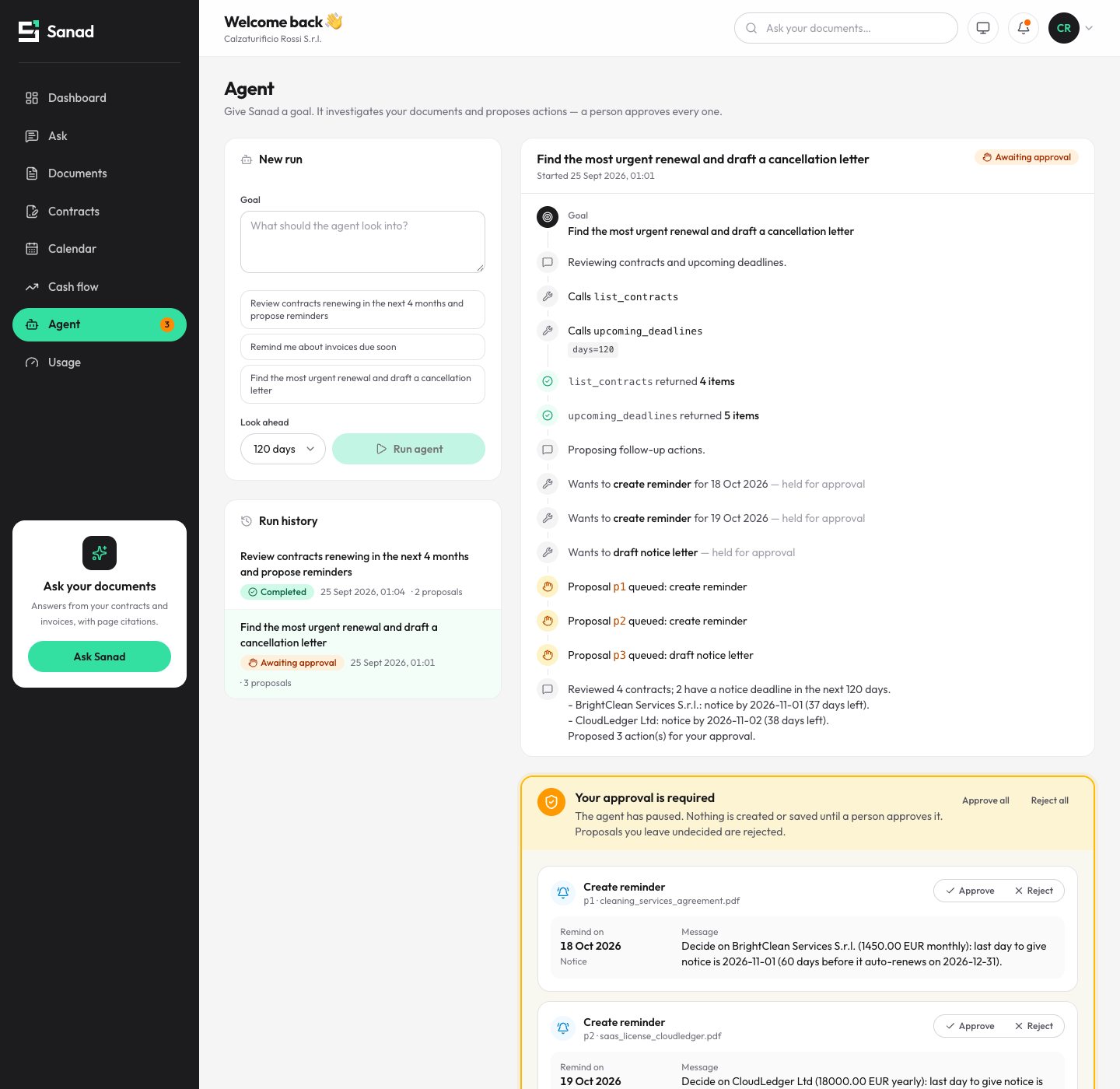
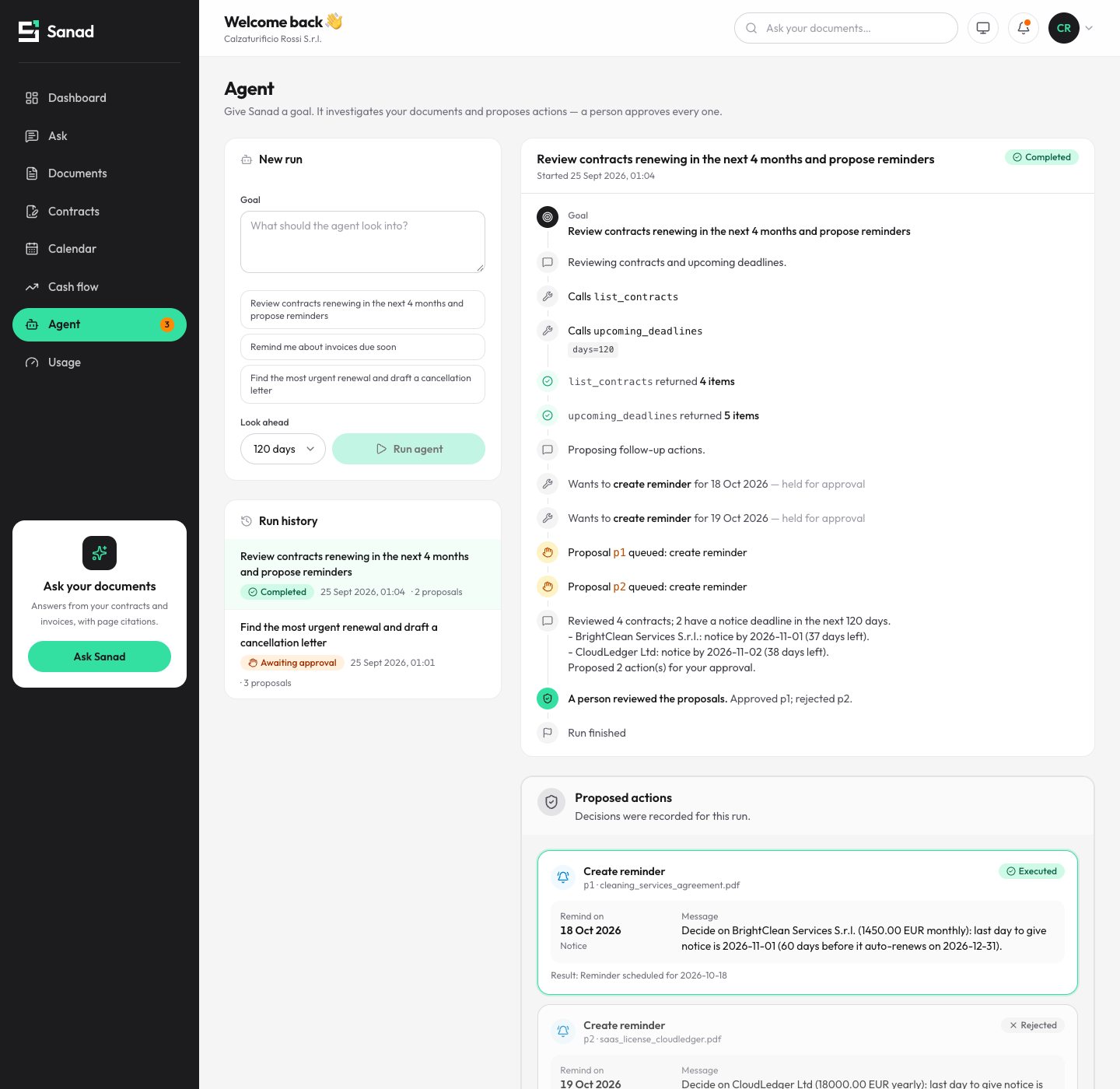
Here, the goal was “find the most urgent renewal and draft a cancellation letter”. The agent read the contracts and deadlines on its own. Then it stopped with two reminders and a draft notice letter. Nothing is created or saved until someone approves.
The approval can come days later. Each run is saved in the database, so a decision can arrive after a restart. Every step, tool call, proposal and decision is stored in an audit log. Letters are saved, never sent.
What happens after you approve?
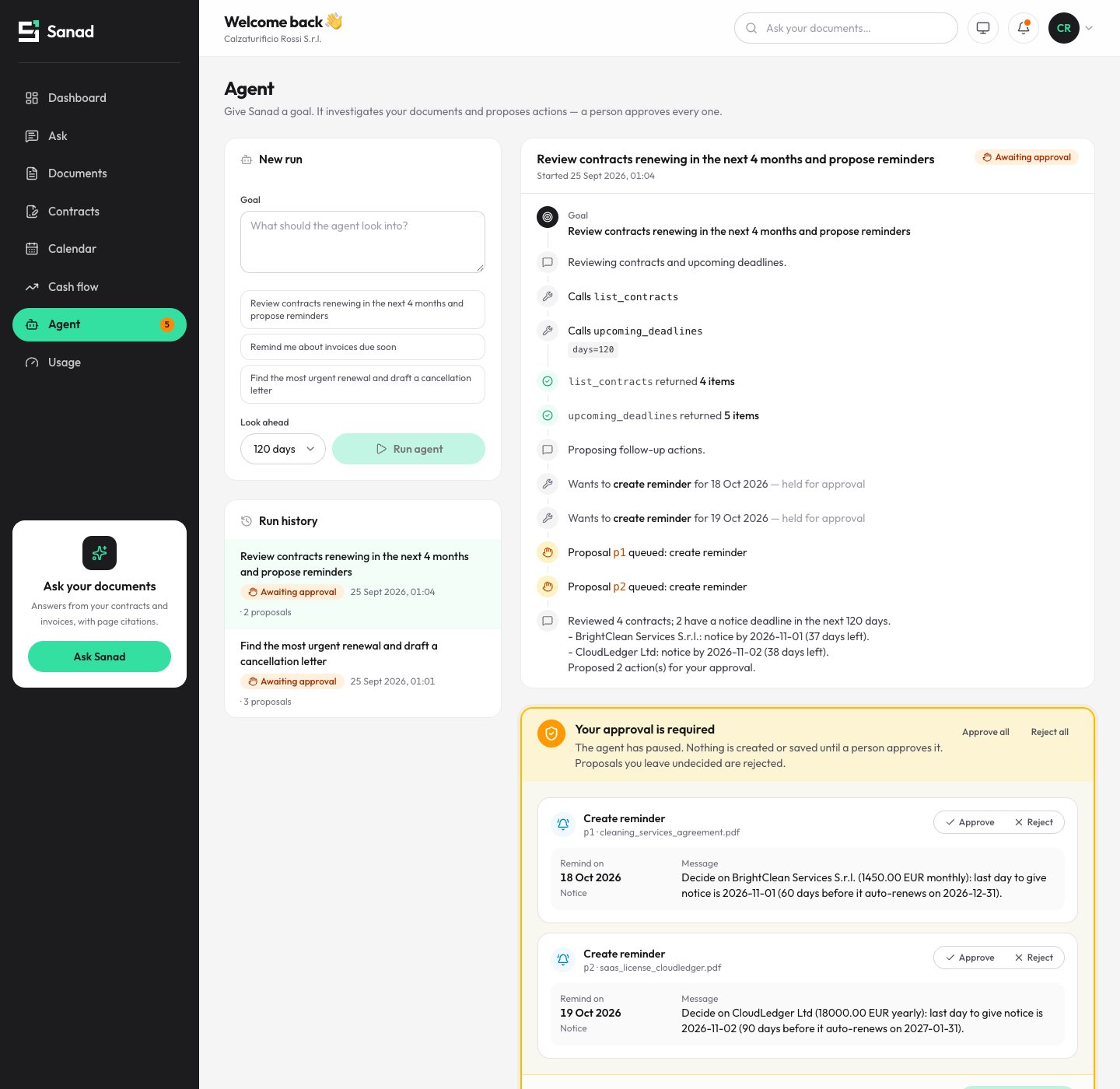
Only what you approved runs, and the record shows who decided. In the run at the top of this post, the agent proposed two reminders. One was approved and executed, the other was rejected.
- You give a goal.For example “review contracts renewing in the next 4 months and propose reminders”.
- The agent investigates.It calls its read tools and reports what it found: which contracts have a notice deadline coming up, and how many days are left.
- It proposes, then pauses.Each action is listed with the document it came from. Nothing happens yet.
- A person decides.Approve one, reject another. The decision is written to the audit log with who and when.
- Approved actions run.The approved reminder is scheduled. Approved reminders are emailed when email sending is set up, or just logged.
Checks before anyone reviews
Approval only works if the person isn’t reviewing nonsense. So the obvious errors are caught by code first, before the human sees anything.
In Sanad, extracted terms such as the notice period, fee and payment terms are each tied to the pages they came from. Implausible values are rejected: a notice period of 900 days or a negative fee never reaches the register. Duplicate files are caught by their content.
In VYNORO, my AI team for small agencies, the checks run before the AI manager even reviews the work. An email address counts only if it appeared on a page the team actually opened. A number has to appear in the evidence. Errors go back for one short rewrite.
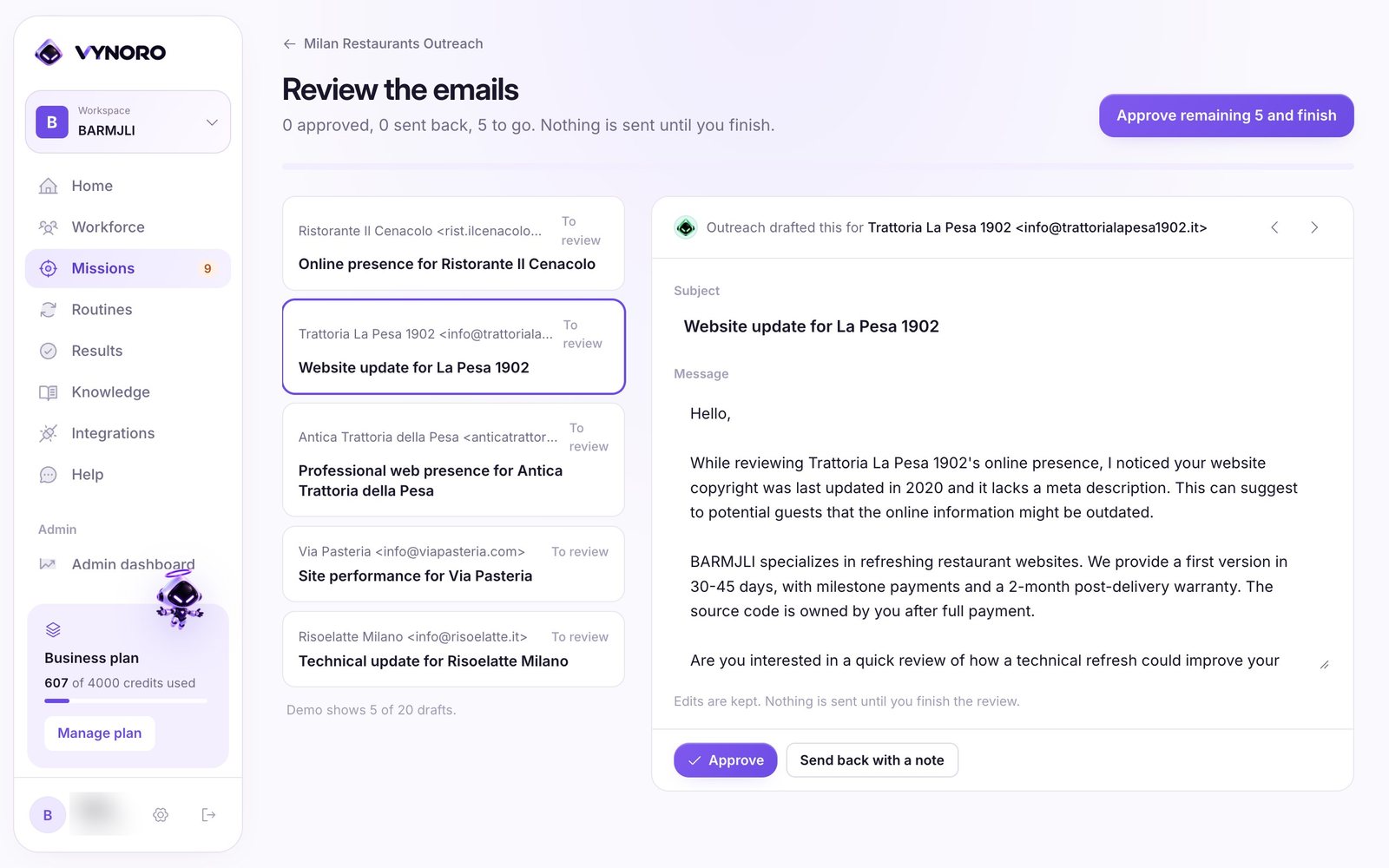
Then the human review. Drafts wait in a queue, and nothing leaves the workspace until the owner finishes. When the owner edits a draft or rejects it with a note, that becomes a short lesson the team uses next time, for example how to sign emails. I wrote more about this in how I hand work to an AI team without losing control.
Which tasks should need approval?
Anything that sends something or changes important data. Here’s the table I start from with a new company. Adjust it to yours:
| Task | Agent alone? | Why |
|---|---|---|
| Read and sort incoming emails | Yes | Reading changes nothing |
| Extract fields from an invoice or PDF | Yes, with the source page | A person can check any value in one click |
| Prepare a new row or CRM update | Proposal, then approve | Wrong data spreads to every report that uses it |
| Draft a reply, reminder or letter | Yes, as a draft | A draft costs nothing until it’s sent |
| Send anything outside the company | Never without approval | Your name is on it |
| Pay, cancel or sign | No | A person does this, with the agent’s preparation |
What does it cost, and what’s the trade-off?
The real cost is a few minutes of human review, and that’s by design. Here’s the full picture:
- Review time. Someone must read the proposals. In VYNORO I call that the product’s position, not a limitation to remove.
- Approval fatigue. Stopping before every step trains people to click approve without reading. That’s why harmless reads run on their own.
- Model costs. Agents that loop with tools can burn money quietly. In VYNORO every AI call is logged with its estimated cost, and a mission starts with a 1 USD budget that pauses at the limit. In Sanad, cost is metered per company and per operation. My post on AI features that cost too much goes deeper.
- Upkeep. Code checks can flag a correct number written differently from the source. Rules need tuning as real documents arrive.
- Building it. Scope, timeline and price are agreed in writing before work starts.
One honest note for Italian companies. If your invoices already arrive as electronic invoices through the SDI, they’re structured XML, and reading them may need a parser, not AI. Importing SDI XML is on Sanad’s roadmap, not built yet. AI earns its place on the messy documents: contracts, PDFs, emails.
How to start without betting the company
Start small, keep a person in charge, and measure. A practical first project looks like this:
- Pick one flow. For example supplier invoices from one inbox into one spreadsheet.
- Collect real examples. A few dozen documents, including the ugly ones.
- Write down the fields. Exactly what gets typed today, and where it goes.
- Name the approver. One person who reviews proposals, and how often.
- Start read-only. Let the agent extract and propose for a while before any action is approved.
- Check the log. Look at what was rejected and why. That’s where the next improvement is.
What to do next
If your team spends hours retyping documents, write down the one flow that annoys them most. That’s your first agent.
The Sanad case study shows the approval agent in detail, and the VYNORO case study shows the review queue and code checks. If you also want staff to ask questions about the same documents, read how an AI assistant over your own documents should work. For the build side, there’s how I built VYNORO alone.
My services page covers AI agents and workflow automation. I’m based in Macerata and work with companies across Italy and Europe. Tell me what your team retypes, and I’ll reply with questions or a plan for a first call.
About the screenshots: the Sanad images come from its demo company, a fictional shoe maker in the Marche. The VYNORO image comes from my own workspace for my agency, Barmjli, running real missions on public data.
Questions people ask
Can AI automate data entry from invoices and PDFs?
Is it safe to let an AI agent act on its own?
What does human-in-the-loop approval look like in practice?
Does approving everything slow the work down?
Can you build an approval-based AI agent for my company?
I build AI agents, web apps and mobile apps for businesses, and I run my own agency, Barmjli. I write here about what I build and what it taught me.